August 6, 2013

Cultured beef, steam power and slavery

Hypothesis

The advent of cultured meat will change the perception and interaction humans have with animals --- gathering all species under one flag, very much like steam machines ignited human rights for humans.

Reasoning

Back in the late 18th century the ability to substitute slaves with steam powered machineries shifted the lens through which we looked at slavery.
The "Let's buy a slave to do the job!" option in agriculture turned into a --> "Well, I guess this never-tired steam machine offers a better return on investment, so why buy a slave? ", and finally became a --> "Hey guys, maybe we should end slavery...".


Steam revolution exposed this cognitive dissonance that was going on for centuries, and slowly de-normalized the coping mechanisms (racial hierarchy) people use to secure their needs (work supply).

Likewise, abundant cultured beef may slowly end the coping mechanism we created long ago to dissociate us from the slaughtery of other living beings.

And if killing animals is no longer justified by our meat consumption needs, then speciesism shoud slowly fade into history, opening the doors to a new era of economic and behavioral interactions with other species.

Some related articles:
http://www.reuters.com/article/2013/08/05/us-science-meat-in-vitro-idUSBRE9740PL20130805
http://on.ted.com/forgacs
[Updated on 14/08/2014] https://www.youtube.com/watch?v=Ttl47rss9Rk

July 27, 2013

What would micro gaming look like ?

Micro stories

Micro stories are crazy short narratives, carrying the essence of emotions one would found at the climax of a story.

ex1: six-word novel by Ernest Hemingway
For sale: baby shoes, never worn


ex2: [courtersy of 365 MICRO STORY PROJECT ]
Two bodies discovered in house

They talked on the phone all night, stitching themselves into each other lives, papering over the cracks that had grown between them. Distance made their differences seem less important. By the time the first light appeared they were together, entwined. 


Micro movies

In the same vein, micro movies would be defined as the essence of emotions one would found at the climax of a movie.

ex: One Last Dive

(...before I go)

...nothing more than the essential.

[Edited  Aug. 10, 2013]: and Vine goes even further with almost nano-movies :)
http://www.youtube.com/watch?v=YI-MIhsx1xg

[Edited  Jan. 22, 2014]:
http://i.imgur.com/wmrc5Xx.gif


Micro blogging

Todays blogs, micro-blogs, tweets, feeds ...etc, are the reflection of this need to cut, simplify until one reaches a burst of words, intense enough to carry the all news.

ex: Today's Gaming Drama

Micro education

ex: Minute Physics: E = mc²

Micro gaming 

What would micro gaming look like ?

ex1: Parameters
(essence of RPG mechanics)... by the way, you should give a try to their other stuff... really amazing work of simplification there.

ex2: A Dark Room

Those two examples are extreme simplification.
But is it all ? Is it what micro gaming would look like ?

If you watch again "One Last Dive" (video above), you'll notice that the shots could have been those of a 2h movie, while "A Dark Room" game could not have been a sub-part of a AAA video game.

So again: what would micro gaming look like if we were to do for games what has been done with "One Last Dive" for movies ?

It'd probably look something like that:
Take the quality of "The Last Of Us", remove all cutting scenes, divide the gameplay hours by 100. You're left with 100 seconds of pure and concentrated horror/adventure/suvival game. Keep a 30sec slow pacing familiarization. Enough to get used to simplified controls, decision system, get bound to characters and set the plot of the game. Then add a 65sec of increasing decisions making, including dangerous climbing, concentrated level design, fights and survival stuff. Finish with a climax, where it all comes together in a brutal ending.
Can we make that for 1/100th of the cost ?... probably something around $500K...
Provided there's enough replayability, players would happily spend $1 for this, resulting in the same gross for fewer risks, and legitimating the effort.

[Edited  Aug. 10, 2013]: Rogue Leagcy is a good candidate for plateformer micro-gaming.

July 12, 2013

Computer Chess - The Movie

How not to play chess...

(1.d4 Nf6; 2.c4 g6; 3.Nc3 Bg7; 4.e4 d6;) 

March 12, 2013

Controlling two characters with one gamepad

Control each brothers with a different analog stick. I love the smell of video games when they look like handmade polished piece of work.


January 26, 2012

Bastion


game genre: voice-over game.


August 14, 2011

Bilan de l'intelligence

"Il y a un peu plus de deux ans, à cette même place [...], je m'inquiétais de l'état actuel des choses de ce monde et j'interrogeais les faits dont nous sommes les témoins et les agents, en me préoccupant, non tant de leur caractère politique ou économique que de l'état dans lequel ils mettent les choses de l'esprit [...].
Nous le trouvons autour de nous comme en nous-mêmes, dans nos journées, dans notre allure, dans les journaux, dans nos plaisirs, et jusque dans notre savoir. L'interruption, l'incohérence, la surprise sont des conditions ordinaires de notre vie [...]. Nous ne supportons plus la durée."

- Paul Valéry, 1935

November 8, 2009

Braid

keywords: Irish folk music, fading-painting-style graphics, time control, XBox360/PC/Mac

Braid won the design innovation award at IGF 2006 (Independent Game Festival), so no need to spend too much time here acclaiming this magum opus... yet - and it's pretty sad - now that the PC/Mac version is out, I realize how Braid still didn't fully reached the widespread notoriety it diserves.
Part of that may come from the (erroneous) perception that this is "just" a glorified plateform game dressed with some fancy hand-drawn rendering. Well no, this is really not "just another plateform game".
Sure Braid uses common gameplay mechanics one saw in hundreds of mario-like games: a princess to be saved, ladders to be climbed, enemies to be scared of, and doors to be opened (through keys to be found). Sure.
But this is just the canvas underlying the true nature of Braid.

Braid
is really in essence a time-based game.
Throughout the journey one is given 4 different time-bending capabilities.
When one of these manipulation techniques is picked-up for the first time you quickly figure out the way it works... but then, confronted with some tricky situation, and after a few puzzling situation, we find ourselves looking at this very same technique from a very different viewpoint. Merely starting to understand how bad one's brain is when it's time to think out of the box and almost feel it awaking as if it were an atrophied muscle.
Braid will make one us realize how time is a very simple yet powerful game-mechanic greatly underused in the video game [writting this in 2009, so who knows about the future].

Portals, Trigger-Zones, Shadow Projections, 3D Prespectives, Time ...etc. We're just starting to unveil how concepts we once thought basic in their usage are latently powerful in their nature; if only we'd dare look at them from a different (yet humble) viewpoint.

Enjoy Braid (and kudos for its creator).

September 24, 2009

Where XUL meets an extension in the biosphere...

IMG_0739

Two years ago I started sharing/backing up some photos/textures on Flickr. Like many others I used Uploadr to do this, and the more I was using it the more a felt annoyed by the lack of a simple yet invaluable feature: being able to zoom into a thumbnail (or at least launch a native OS preview)... you know, just like when you're parsing a bunch of small 100x100 picture's thumbnails on your hard drive and naturally expect that double-clicking one of them would obviously open a wider version (deadly useful to compare pictures quality). Well, Uploadr just doesn't do that.

I first thought that Yahoo (makers of Uploadr and owners of Flickr) would quickly "fix" that. Then I tried a bunch of third party software to replace Uploadr, but none of them was able to cover my needs as well as Uploadr did. In the other hand, I didn't wanted to spend any time in modifying the Uploadr's source code as I really thought the guys at Yahoo would quickly come with a nice and sustainable solution (far better than the ugly hacking bypass I was going to inject).
Two years later, I came to the conclusion that they would probably not add this feature anytime soon. So I decided to dig a little bit in the source code and get that thing done.

I feel at ease (or at least pleased) when I do shaders, game prototypes, and 3d related stuff in general; but going into modifying Uploadr was pretty far from my usual confort zone... yet, in many ways it remained an interesting experience.

Javascript was ok, but XUL is a framework you have to learn and understand at a very least in order to create some extension (for Uploadr or Firefox).

At first, I just started hacking and poking around, hopping I could do some tricks without diving too far into the XUL documentation. And that was true thanks to the powerful openness of Javascript and the data-driven nature of XUL.
But as soon as I wanted the "hacks" to be packaged into some kind of plugin (called extension here) I found myself a little bit lost as I didn't knew how to cross-communicate variables between XUL windows.

And so here I came reading and trying to find my way to reach this little piece of information so relevant to me at that moment. It took me some time of googling... I didn't knew that each XUL window had its own javascript execution context, so I couldn't even google "cross window context communication in XUL" (which would quickly gives relevant results for sure).
The answer came when I finally decided to start reading the documentation from the beginning as if I was planning to follow a 3-weeks XUL course.

Sure once you know where to find this simple information the path looks bright and obvious and you just feel dumb not having started reading "the fucking manual", but if I hadn't said to myself "ok, you'll have to be prepared for a long run into that learning process", I would probably not found the correct way and just given up ('cause after all, my goal was not to get a degree in XUL programming!). The fact is I didn't had to invest 3 weeks into learning XUL at the end, but everything was like I should have been mentally prepared to do so.

The pain of "searching and learning" is intrinsic to big-frameworks. And this is not just about XUL, it's about almost any framework (and to be really sincere, XUL is pretty easy to learn in fact).
The bigger the framework is, the more you have to read the documentation in order to use it and fulfill even the simplest tasks.

That's an ugly and tangible truth, and yet it seems to be a common sense shared by most programmers used to navigate among huge projects or huge companies...

And I can almost say it's hopeless because us, as programmers, we love to build solutions that would solve as many issues as possible, and we love to factorize algorithms so that one can serve many.
But the more we enlarge the scope of a framework, the bigger the framework becomes and the harder it is to be understood (that's the main reason we like to throw away other's work and reinvente the wheel again and again).

It seems obvious and natural to fall into this pattern, creating bigger and bigger... but if that was really the solution there should exist a godfather-framework, able to contain every kind of design pattern and providing kernel solutions suitable for any kind of program. This god-father framework would then get rid of the OS itself and become at the same time the OS and the unique programming language.
Such a framework would be to programs what the earth is to life: the most complex biosphere.

Most programmers can "feel" that such a thing would be a real nightmare to solve and maintain, and nobody would seriously think about creating this; because life (program) is intended to be functional and local to a given environment. There's no such thing as an ubiquitous intelligent machine driving everything, because life pops up everywhere and results in a local adaptation to the context.
So does a program.

If I was to get really extreme in that direction I would even say that there should only be environments (contexts) and tools (snippets); let the life (program) create its own complexity through DNA grammar (language).

Bigger frameworks means;

- Slower innovation to modify the framework (cautions has to be taken to maintain global coherence)
- Slower bug fixes (caution not to break any cross dependencies)
- Spending entire days glueing the framework together instead of implementing features and algorithms, or bug fixes.
- Cumbersome back-compatibility issues.
- Bigger latency to answer user requests (due to numerous time leaks)
- More time spent writing the documentation for the author (in order to glue concepts together and create a coherent hierarchy)
- More time spent reading the documentation for the user (as the user must find his way into the hierarchy and concepts)
- Steeper learning curve for anyone who wants to join the "big" project, or often just use it.
- Endless build processes.
- ... And so on.

I can't find as many arguments to sustain big-framework-addictions (but I do admit and understand there is positive arguments).

10 smaller frameworks/libraries will always give more satisfaction to authors than one unique Über framework -- unless you early dedicate yourself to the exclusive study of this Über framework and quickly become a Jedi master!

Did I said "satisfaction" ? Hey, who ever said software engineering was about satisfaction anyway [sic] ?


Ok, I will end up here this little digression, and for what it's worth, if you're looking for a complete data-driven, open source and robust framework to create cross-plateform applications, XUL/XULRunner seems to be a wise candidate (especially if you want to take advantage of the huge pre-existing Firefox extensions community).

... and would you be curious about this tiny-ugly extension of mine, just look at ZoomThumb Uploadr extension.

August 29, 2009

Elora, Google Insight and FAME

So as I was playing around with Google Insight, I fell upon a nice piece of "future archaeology" micro event... Google Insight shows the fluctuations in people's search terms on Google's search engine. For instance, entering the term "gift" generates a nice periodic curve with peaks around christmas eve, highlighting the fact people tend naturally to postpone gift quest until the last day (and who doesn't).

The nice thing is you can filter the results regions by regions. As soon as Google Insight appeared in 2004, I've been fascinated about the side effects and correlations retrieved from the simple analysis of those curves. One of the most famous example of this is the propagation of flu activity that can be deduced from symptoms people search before going to the doctor.

But in addition to this amazing data mining aspect of Google Insight, I realize it could also be used to report and keep track of a few micro event (if not very personal ones). My daughter's name is Elora, she was born on the year 2005 at the end of december. Searching for its (not so common) name on Google Insight, I discovered that there wasn't any single activity around the term Elora - for the entire region I lived in - before she was born. And obviously, activity becomes noticeable around her birth date, revealing her (proud) parents searches as well as those initiated by friends and familly.
Elora-Google-Insight
My daughter's birth is now traceable on the internet... which is a real "micro event" compared to the global events usualy revealed by Google Insight!
In a thousand years -- provided google databases survives in some way -- an archaeologist, without any  prior knowledge about this event, could yet deduce that a girl once named Elora was born there on the year 2005 around decembre 25th. That's what one could define as a "Future Archaeology Micro Event" (or just pompously FAME!).

April 29, 2009

Windosill

Currently playing Windosill, a flash-based game bundled inside a small executable.
Trying to give a taste of it...
Ok, it's a point & click (& drag) game where there's nothing to do but try to discover what kind of interaction hides behind each game scene.
No UI, no documentation, no rules; even the title screen is smartly embeded inside the game progression. Every object stands here for a good reason... or maybe not -- after all you are the only human in this place who can figure it out. All around there's only strange resting entities awaiting for you to make them "live" and interact (always in the most unexpected manner).
There's physics everywhere; rigid AND soft bodies so you can very naturally feel contacts, collisions and friction.
But the most impressive part comes from the refreshing aesthetic game design and artistic viewpoint the author injected in the whole process. By no way Windosill looks like anything you've already played before. It's perfectly tilted and shifted in just the right proportion to be defined without any doubt as a brilliant put-a-smile-on-your-face game.
Finally, the only regret comes from it not having been programmed in a faster language than flash, which can definitely not compete with low level compiled languages when it comes to skinned meshes and heavy physics (for now).
Result is a quite slow frame rate [15fps] on a 3 years old laptop... it hurts.
But still there's zero reason not to enjoy this masterpiece now (and buy the full version for only 3$ !).

April 22, 2009

First Test With O3D


Facts:

  • Automatic frame rate adaptation: As long as frame rate is good (greater than 60 fps) more geometry is added and grid gets bigger.

  • Shader-based deformation.

  • Could be greatly optimized if creating a single mesh instead of several transform nodes.

Known Issues:
  • On my laptop (T60p) hardware acceleration doesn't work on chrome (strangely) but it does in IE and Firefox.

January 1, 2000

Keyboard Clicker

Keyboard Clicker is a Win32 system tray program that emulates mouse clicks with the keyboard. It does this by hooking keyboard events and redirecting some user defined keys strokes into mouse clicks.


Requirements

Windows Vista, XP (never been tested on other Windows versions).


Install

Download KeyboardClicker.zip and unzip it where you want.
Keyboard Clicker doesn't require any installation, simply launch the executable.


Uninstall

Launch UninstallKeyboardClicker.reg to make sure nothing relative to Keyboard Clicker is left in the registry.
Note: the Keyboard Clicker registry key is created only if you modify the default settings. So you may not even need to ever launch UninstallKeyboardClicker.reg.


Launch

When launched, KeyboardClicker displays an icon in the taskbar's system tray.
This icon describes the current state of KeyboardClicker; by default it shows the Standard Mode (see bellow).


Standard Usage


This is the default mode when KeyboardClicker starts.
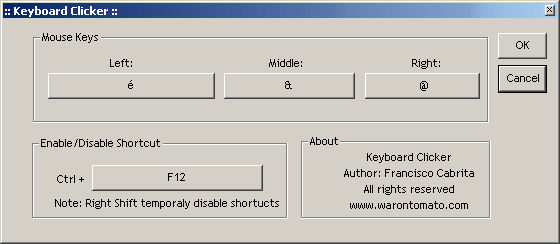
3 keys on the keyboard are used to emulates the Left, Middle and Right mouse clicks; by default those are the first 3 key locate on the far top-left of the keyboard in the row beneath F1-F12 keys.
For instance, on my Azerty MacBook keyboard those are the @, & and é keys.

Most people are right-handed so those default keys have been choosen so that you can still manipulate the mouse with your right hand and use your left hand to perform clicks. To make it more ergonomic, the left hand is far on the left of the keyboard, and to keep it natural the keys are mirrored compared to the orientation of the mouse keys. This way you still use the index finger to perform a left click (but this time with your left hand), the middle finger to perform a middle click, and the ring finger to perform a right click... the only difference is that you do it with your left hand!
It may looks a little bit awkward, but it is in fact a very ergonomic and natural position.


Disable Keyboard Clicker

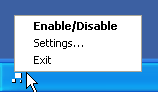
Right-click on the Keyboard Clicker systray icon and choose "Enable/Disable"


A faster way to disable Keyboard Clicker is by pressing Ctrl + F12 (provided you use F12 as the Enable/Disable key).
When disabled, Keyboard Clicker systray icon switches to this icon: .
Pressing Ctrl + F12 again will bring back Keyboard Clicker to its previous active mode.

Note: See the "Tips" paragraph to learn how to access overridden keys.


Settings

Right-click on the Keyboard Clicker systray icon and choose "Settings..."


In the settings dialog mode you can customize the "click" keys. This is essential if you're not right-handed or if you use a different keyboard layout.
You can also customize the "Enable/Disable" key.

Simply click on one of the large buttons and choose your key.

Note: When you modify the settings for the first time, a registry key is created in order to remember your custom changes. If you ever want to come back to the default settings all you have to do is to launch UninstallKeyboardClicker.reg.


Special Modes

In addition to the standard mode, there's two other modes you may find useful.
Press Ctrl + Shit + F12 to cycle through modes (provided you use F12 as the Enable/Disable key).

  • Baby Mode

    In this mode, the List key, the Windows key, the Function key and the start of AltGr key will all be disabled. Very useful when you let a baby use the keyboard to play a game and don't want him to accidentally press the deadly-windows-keys.
  • Mega-Baby Mode

    In this mode, all keys are disabled. Very useful when you want to watch a movie with the laptop on the sofa with the cat trying very hard to disturbe you by pressing some random key :)
Whatever mode you're into, you can always use your get your normal keyboard behavior back by disabling Keyboard Clicker (Ctrl + F12).


Tips

- When the left Shift key is pressed, Keyboard Clicker, while still showing the standard active icon in the systray, will in fact temporarily be disabled. This is a nice and quick way to access the "1" and "2" keys on a typical AZERTY keyboard without having to press Ctrl + Shift + F12.

- I personally like to put a shortcut to KeyboardClicker.exe in my desktop or somewhere in the task bar and associate it a keyboard shortcut (Ctrl + Shift + K for me). This way I don't even need to use the mouse to launch Keyboard Clicker.